3 mins min read • 28 September 2026


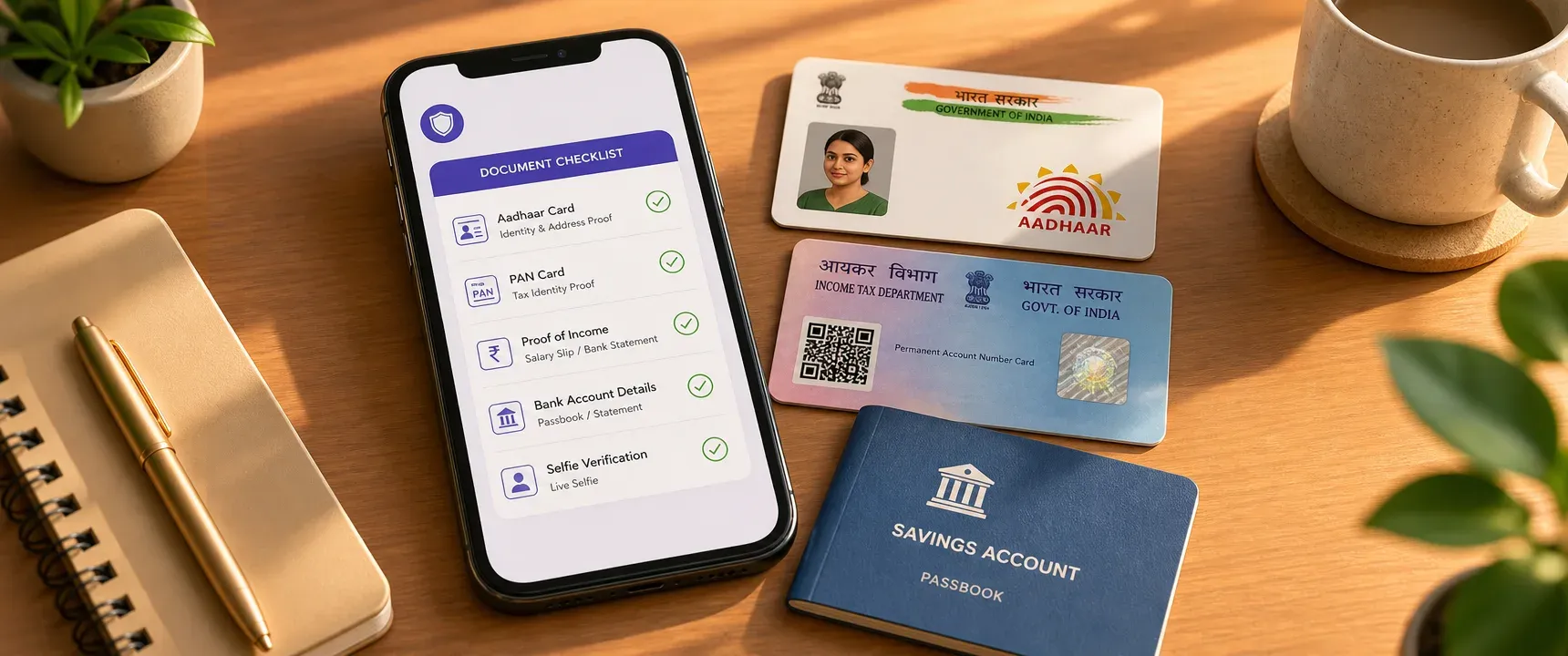
Table of content
Overview
What is an instant personal loan?
Documents required for application
FAQs
A rejected loan application stings, but a rejection caused by a blurry Aadhaar scan or a mismatched bank name stings worse. When you apply for an instant personal loan through mPokket, the entire journey from KYC to disbursal can happen in minutes. That speed only works, though, if your documents are ready, clear, and consistent before you tap "Apply."
Follow our Whatsapp Community for more offers and updates.
Join nowAn instant personal loan is a short term, unsecured borrowing product processed entirely online. There is no branch visit, no collateral, and no lengthy paperwork. Digital lenders like mPokket use Aadhaar and PAN based KYC, income verification, and alternative data assessment to approve and disburse funds quickly.
The "instant" label refers to speed of processing, not the absence of checks. Every lender still verifies your identity, income stability, and repayment capacity. The difference is that these checks happen digitally, often within minutes, when your documents are accurate and upload ready.
Before opening any loan app, gather the following documents. Having them accessible on your phone or as clear scans can help reduce upload errors and re-submission requests.
| Document category | Accepted formats | Why it is needed |
|---|---|---|
| Aadhaar card | Front and back photo or downloaded Aadhaar PDF from UIDAI | Identity and address verification through OTP based digital KYC |
| PAN card | Clear photo or scanned copy | Tax identity verification and name cross check |
| Proof of income | Salary slip, bank statement with salary credits, client invoices, or receipts | Confirms repayment capacity and income stability |
| Bank account details | Passbook first page photo, cancelled cheque, or bank statement header | Enables direct bank transfer of loan amount after approval |
| Selfie (if required) | Live selfie taken within the app | Matches your face to Aadhaar photo for selfie verification |
mPokket's paperless loan application process is designed to accept digital uploads of these documents. You do not need to visit a branch or courier physical copies.
The single most common reason for document rejection is a name mismatch. Your name on Aadhaar, PAN, and your bank account must be identical. If your Aadhaar says "Priya Sharma" but your PAN reads "Priya S," the automated KYC system may flag the discrepancy.
Before applying, compare the full name printed on each document. If there is a difference, update the record through the issuing authority (UIDAI for Aadhaar, Income Tax Department for PAN) before starting your application. This step alone can help prevent the most frequent verification failure.
Digital KYC systems read text from your uploaded images using optical character recognition. A blurry photo, a shadow across the card, or a cropped corner can make the text unreadable. Follow these practices for better results.
Place the document on a flat, well lit surface. Use your phone camera in standard photo mode, not portrait mode. Make sure all four edges of the card or page are visible. Avoid flash if it creates a white glare on laminated cards. Check the preview before uploading to confirm every character is legible.
For Aadhaar, upload both front and back. The back contains the address and QR code that lenders use during OTP based verification.
Income proof requirements differ by employment type. Preparing the right format before you apply can help avoid unnecessary back and forth.
Salaried employees should keep a salary slip from the most recent month or a bank statement showing at least one or two salary credits. The statement should clearly display the employer name in the transaction narration.
Self-employed professionals, freelancers, and gig workers can use bank statements showing regular deposits, client invoices, or payment receipts. mPokket is designed to use alternative data assessment for applicants who may not have traditional salary slips, which can help borrowers like delivery partners, cab drivers, and freelancers.
Homemakers applying for a personal loan through mPokket should check the specific income documentation the app requests, as eligibility criteria may vary.
After approval, mPokket is designed to transfer the loan amount directly to your verified bank account. An incorrect account number or IFSC code delays disbursal. Before you start, verify these details.
Open your banking app or passbook. Confirm the account number, IFSC code, and the name registered on the account. The account holder name must match the name on your Aadhaar and PAN. Joint accounts may not always be accepted; a single holder savings account is generally preferred.
If you recently changed banks, make sure the new account is active and has processed at least one transaction. Dormant accounts can cause transfer failures.
OTP based digital KYC requires the mobile number registered with your Aadhaar. If your current number is different from the one linked to Aadhaar, you will not receive the OTP needed to complete verification.
Check your Aadhaar linked mobile number by visiting the UIDAI portal or calling the Aadhaar helpline. Updating a mobile number on Aadhaar requires a visit to an enrolment centre, so plan this well before you need the loan.
Your bank account should also be linked to the same active mobile number. This ensures you receive transaction alerts and repayment reminders from mPokket.
Create a dedicated folder on your phone for loan documents. Save clear photos of your Aadhaar (front and back), PAN card, latest income proof, and bank details in one place. This avoids the scramble of searching through your gallery mid-application.
Name each file clearly: "Aadhaar_front," "PAN_card," "salary_slip_Sep2026." When the app prompts you to upload, you can select the correct file instantly. This small habit can help shave minutes off the process and reduce the chance of uploading the wrong image.
Run through this final checklist before tapping the apply button on mPokket or any instant personal loan app.
Confirm your name matches across Aadhaar, PAN, and bank account. Verify your Aadhaar linked mobile number is active. Ensure all document images are clear, complete, and unobstructed. Check that your bank account is active and the IFSC code is current. Review your income proof to confirm it reflects recent earnings.
Completing this review once, before you start, is designed to help the entire application flow smoothly from profile completion through digital KYC to direct bank transfer disbursal.
Preparing your instant personal loan documents before you begin the application is not complicated, but it does require attention to detail. Name consistency, image clarity, correct bank details, and an active Aadhaar linked mobile number are the four pillars of a smooth, paperless experience. mPokket's digital lending process is designed to move quickly when these basics are in order. Spend ten minutes organizing your documents now, and you can help position yourself for faster approval when you need funds most.
mPokket typically requires an Aadhaar card, PAN card, proof of income (such as a salary slip or bank statement), and bank account details. A live selfie may also be needed for identity verification during the paperless application process.
Yes. mPokket is designed to offer unsecured instant personal loans, which means no collateral or asset pledge is required. Approval is based on identity verification, income assessment, and repayment capacity rather than physical security.
A name mismatch can cause the digital KYC verification to fail, delaying or blocking your application. Update the inconsistent record through UIDAI or the Income Tax Department before applying to help avoid this issue.
Yes. mPokket is designed to assess applicants using alternative data, which can help freelancers, gig workers, and delivery partners who lack traditional salary slips. Bank statements and client invoices may serve as income proof.
You can verify your Aadhaar linked mobile number through the UIDAI website or by calling the Aadhaar helpline. If the number is outdated, visit an Aadhaar enrolment centre to update it before starting your loan application.
What Is an Unsecured Business Loan?
4 min read • 23 July 2026
5 Ways Paperless Loan Applications Simplify Loan Access
4 min read • 7 May 2026
The growing role of alternative borrower signals in India's digital credit market
3 mins min read • 20 September 2026